
WhatsApp is adding more AI-powered features to make messaging easier and more personal. Two areas getting attention are Message Summaries powered by Meta AI and AI-generated chat wallpapers, alongside expanded chat theme customisation on supported devices.
Message Summaries are designed to help you catch up on unread conversations without scrolling through every message. Meanwhile, AI wallpapers and chat themes let you change the appearance of individual chats to match your preferences.
Here’s how these features work, how you can use them, and what to know about their availability and privacy.
WhatsApp Message Summaries: Catch Up on Long Chats With Meta AI
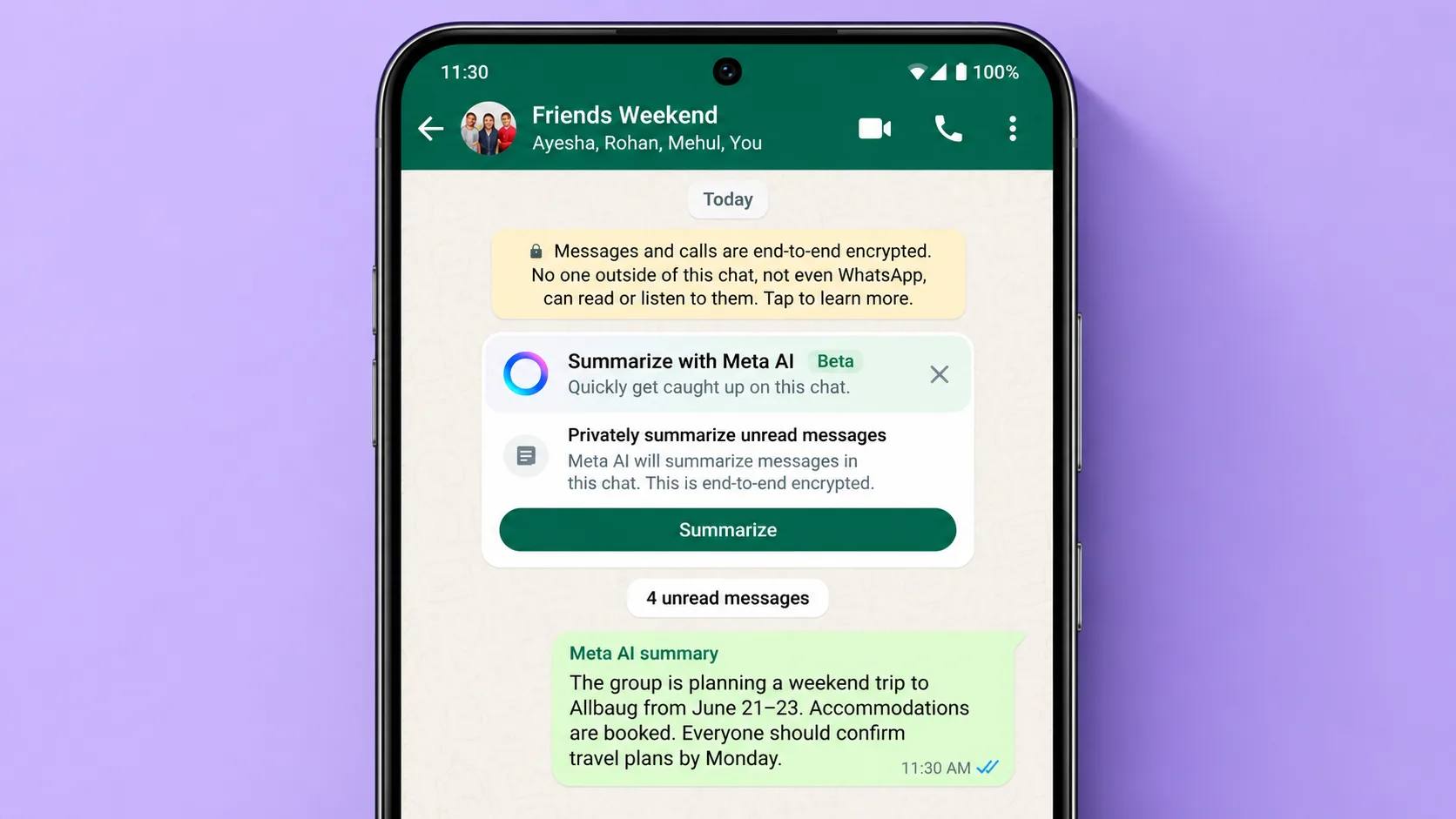
Keeping up with busy WhatsApp groups can take time, especially when dozens of messages arrive while you’re away. Message Summaries aim to make this easier by providing a short overview of unread messages, helping you understand the main points before opening the entire conversation.
When the feature is available on your account, you can use it to get a summary of an eligible chat instead of manually reading every unread message.
How WhatsApp Message Summaries Work
The feature uses Meta AI technology to generate a concise summary of selected unread messages. Rather than presenting the entire conversation again, it highlights key information in a shorter format.
For example, if your family group has been discussing dinner plans, a summary might help you identify the agreed time, location, and other important details without reading every reply.
Message Summaries are intended to make catching up quicker, but AI-generated summaries can occasionally miss context or misunderstand a message. It’s worth opening the original conversation whenever you need to confirm exact details.
Are WhatsApp Message Summaries Private?
Privacy is an important consideration because WhatsApp conversations can contain personal information. WhatsApp has described a technology called Private Processing for certain AI features, designed to process eligible requests without exposing message content to WhatsApp or Meta.
The system is intended to provide privacy protections during processing, rather than treating AI summaries like ordinary messages sent to a public chatbot. WhatsApp has also discussed security measures such as confidential processing environments and mechanisms intended to make the system independently verifiable.
However, privacy protections depend on the particular feature and implementation. Avoid assuming that every AI feature uses identical safeguards. Check the information displayed in WhatsApp when the feature becomes available to you.
WhatsApp has indicated that summaries created through this system are intended to remain private to the person requesting them. The summary is not simply posted back into the conversation for everyone to see.
Choose Which Messages to Summarise
Depending on the version and settings available to you, WhatsApp may offer controls that let you decide whether to use Message Summaries. The feature is not necessarily enabled for everyone by default.
WhatsApp also offers Advanced Chat Privacy, which can restrict certain ways chat content is used or shared. Its protections should not be confused with a universal switch that disables every AI feature, so review the specific options available in your app.
If Message Summaries are available on your device, follow the prompts shown in WhatsApp to use them. Availability can depend on your region, language, app version, and account eligibility.
Availability of WhatsApp Message Summaries
The initial rollout of this feature has been limited, with availability beginning in selected markets and languages. The feature may not appear on every iPhone or Android device at the same time.
If you cannot find Message Summaries in WhatsApp, check for an app update and look at the feature announcements for your region. Installing the latest version does not guarantee access if your account has not yet been included in the rollout.
WhatsApp Tracking
WhatsApp AI Chat Themes and Meta AI Wallpapers
Along with helping users manage messages, WhatsApp is exploring ways to make chats more personal. AI-generated wallpapers and expanded theme options allow users to move beyond the standard backgrounds and colours.
Instead of applying the same plain wallpaper everywhere, you may be able to choose different designs for different conversations. This makes it easier to give personal chats, family groups, and work conversations their own appearance.
Create Custom Chat Wallpapers With Meta AI
AI wallpaper tools can generate designs from a written prompt. Rather than searching through your gallery for a suitable background, you describe the look you want and let the AI create a design.
For example, you could try prompts such as:
- A peaceful forest covered in morning mist
- A colourful wallpaper inspired by a summer holiday
- A minimal blue-and-white abstract background
- A soft floral design with pastel colours
- A night sky filled with stars and a crescent moon
The generated options can give you different styles to choose from. If the first result is not quite right, changing the prompt may produce a different mood, colour combination, or visual style.
The exact prompt controls and available editing options depend on the version of WhatsApp and the AI wallpaper feature you receive.
Apply Different Themes to Different Chats
A chat theme can change the overall appearance of a conversation, including elements such as message bubble colours and the background wallpaper.
If per-chat themes are supported in your version of WhatsApp, you can personalise individual conversations instead of using one design across the app.
For instance, you might prefer a calm, understated theme for work messages and a brighter wallpaper for a group of friends. A family conversation could have a warm background, while a study group could use a simple design that keeps messages easy to read.
These customisations are primarily visual. They do not change how messages are delivered or give a conversation additional privacy protection by themselves.
When Will AI Wallpapers Be Available?
AI wallpaper features may be introduced gradually through beta versions before reaching a wider audience. A feature appearing in a beta release does not mean it is already available to all WhatsApp users.
If you want to try the feature, keep WhatsApp updated and check the chat theme or wallpaper settings on your device. If the AI option is missing, it may not have reached your account yet.
You should also remember that AI-generated images may not always match your prompt perfectly. Review a design before applying it, especially if you want a particular colour scheme or a clean background.
WhatsApp Chat Themes on Mac: More Ways to Customise Conversations
WhatsApp’s desktop experience is also receiving attention, with theme customisation intended to make conversations feel more personal on larger screens.
Depending on the version and rollout, Mac users may have access to preset themes or additional controls for changing chat colours and backgrounds.
Preset Themes and Colour Options
Preset themes offer a convenient way to change the appearance of WhatsApp without manually adjusting every visual detail. A theme may combine a background with matching message bubble colours to create a consistent look.
Where the feature is available, additional colour choices and brightness controls can provide more flexibility. You can choose a subtle design for everyday messaging or a more colourful appearance if that suits your preferences.
The number of preset themes and colour options may change between versions, so the options shown in your own app are the best guide to what is currently supported.
Customise Individual Chats on Mac
Per-chat customisation can be useful when you manage several types of conversations throughout the day.
For example, you could choose one theme for work-related chats and another for friends or family. Different visual styles may help you recognise conversations more quickly, particularly when you switch between several chats.
To check whether individual chat themes are available, open WhatsApp on your Mac and explore the conversation information and appearance settings. The exact menu names can vary with the app version.
Do WhatsApp Themes Sync Between Mac and Phone?
Do not assume that a theme selected on your Mac will automatically appear on your phone, or vice versa. Theme availability and synchronisation behaviour can differ depending on the feature and software version.
If you prefer separate appearances across devices, check how your version handles theme settings. If a theme does not carry over, you may need to configure the appearance independently on each device.
Desktop customisation features may also roll out gradually, so not every Mac user will necessarily see the same options immediately.
How to Get These WhatsApp Features
If you want to check for Message Summaries, AI wallpapers, or new chat themes, start with these steps:
- Update WhatsApp: Install the latest version available for your device.
- Check the relevant settings: Explore chat themes, wallpapers, and any AI-related options that appear in your app.
- Review feature availability: Some tools may be limited to particular regions, languages, devices, or beta users.
- Read the privacy information: Before using an AI feature with personal conversations, review the explanation WhatsApp provides for that feature.
- Give new features time to roll out: If an option is missing, it may not yet be enabled for your account.
Joining a beta programme, where one is available, does not guarantee that every experimental feature will appear on your device.
Final Thoughts
WhatsApp Message Summaries and Meta AI chat themes focus on two different parts of the messaging experience: managing conversations and personalising their appearance.
Message Summaries can make it easier to catch up on lengthy chats, while AI-generated wallpapers and chat themes offer more ways to customise conversations. Desktop theme options can also help users create a more personalised WhatsApp experience on Mac.
Availability and controls may vary by device, region, language, and app version. Before relying on a new feature, check whether it is available in your account and review the privacy details provided by WhatsApp.
As these tools become more widely available, they could make everyday messaging more convenient without requiring users to change how they normally chat.