How to Remove Sent Messages on Instagram Chats
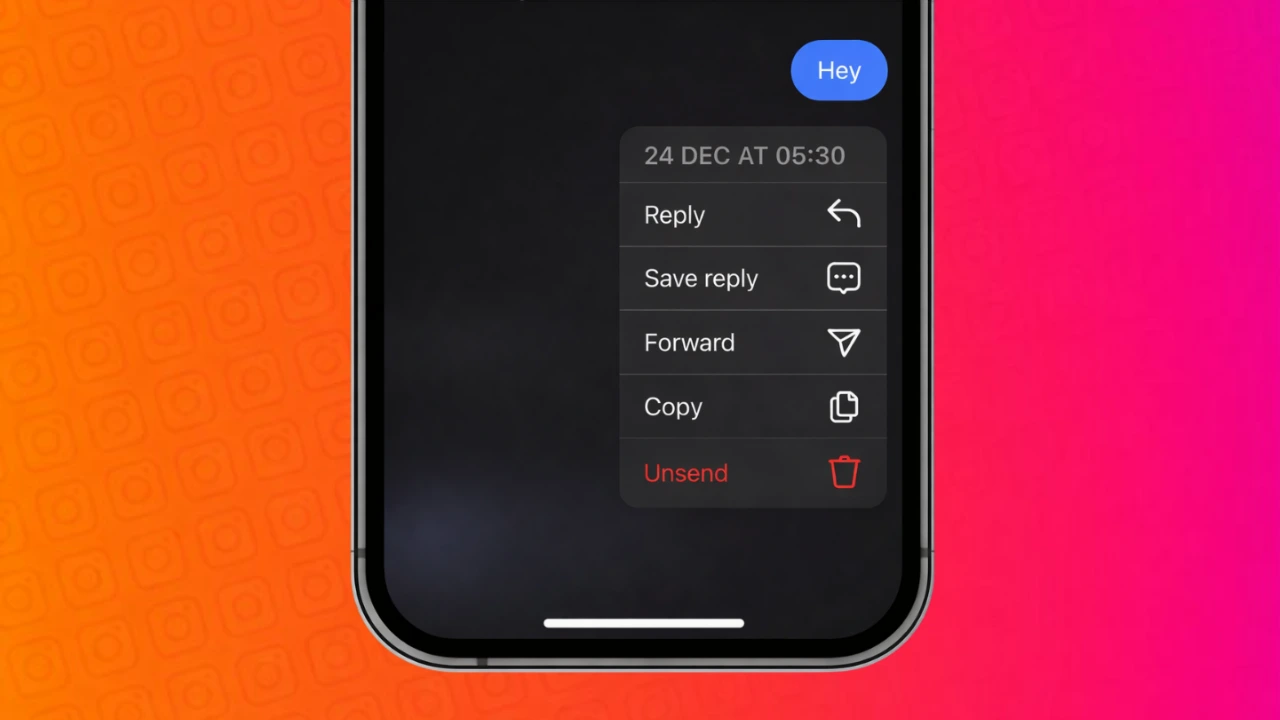
Instagram messages are often sent quickly, and sometimes we regret hitting the send button. It could be a typo, a wrong message, or something you simply do not want the other person to see. The good news is that Instagram gives you an official option to remove messages from chats.
In this guide, you will learn how message removal works on Instagram, what happens after you remove a message, and what limitations you should keep in mind.
Also read: What Different WhatsApp Call Messages Really Mean and Why You See Them
Can You Remove Messages on Instagram?
Yes, Instagram allows users to remove messages using the built-in “Unsend” feature. This is an official option provided by Instagram and works for both Android and iPhone users.
When you remove a message, it disappears from the chat for both sides. The other person will not be able to see that message anymore.
How to Remove a Sent Message on Instagram
Follow these simple steps:
- Open the Instagram app on your phone
- Tap the Messages icon in the top right corner
- Open the chat where you sent the message
- Long press on the message you want to remove
- Tap “Unsend”
- Confirm the action
Once done, the message is removed from the conversation instantly.
What Happens After You Unsend a Message
After removing a message:
- The message disappears from both chats
- There is no “message deleted” note shown
- The action cannot be undone
- You cannot recover the removed message
This makes the feature useful for correcting mistakes, but it should be used carefully.
Is There Any Time Limit to Remove Messages?
No. Instagram does not apply any time restriction for removing messages. You can unsend a message even days or weeks after sending it.
However, if the other person has already read the message, removing it will only prevent them from seeing it again.
Also read: Instagram Introduces ‘Your Algorithm’: An AI-Powered Tool to Personalize Your Reels Feed
Can the Other Person Know You Removed a Message?
Instagram does not send any alert or notification when a message is removed. If the person has not opened the chat yet, they may never know the message existed.
If they already saw it, they will simply notice that the message is no longer there.
Does Removing Messages Work in Group Chats?
Yes. The unsend feature works in group chats as well. When you remove a message, it disappears for all members of the group.
This is useful if you accidentally send something to the wrong group.
Things You Should Keep in Mind
- You cannot remove multiple messages at once
- Removed messages cannot be recovered
- Screenshots taken before removal cannot be controlled
- The feature works only inside Instagram chats
Always double-check messages before sending to avoid needing removal later.
Also read: Simple Tips to Lower Google Chrome Memory Usage on Any Computer
Final Thoughts
Instagram’s message removal option is a simple and effective way to fix messaging mistakes. Since it is an official feature, you do not need any third-party apps or tools. Just long press, unsend, and the message is gone.
Used wisely, this feature helps keep conversations clean and stress free.


Post Comment